Friday, August 19, 2011

"To A Butterfly . . ."

  “I've watched you now a full half-hour; Self-poised upon that yellow flower And, little Butterfly! Indeed I know not if you sleep or feed. How motionless! - Not frozen seas more motionless! And then what joy awaits you, when the breeze hath found you out among the trees, and calls you forth again! . . .”  
 A Quote from “To a Butterfly” 
by William Wordsworth (1801) 

There are estimated 28,000 species of butterflies known worldwide. To put that in perspective, if you gave yourself one second per butterfly it would take you nearly 8 hours to mention them all by name. Then again, how fast can you say ‘Celastrina Argiolus Britannia’?

  
A butterfly's wingspan can range in size from a tiny five mm all the way up to a foot long!

The smallest known butterfly is the Western Pygmy Blue. Its wingspan is between 5-7 millimeters wide. How big is that? Well, a dime (the smallest of the American coins) is 17mm wide. That would mean two, or even three, of these tiny butterflies could sit side by side on it.

How big is the biggest butterfly? Just the body of the Queen Alexandra's Birdwing can have a length of 8 cm (that's 3 inches), but their wingspan can be as big as 31 cm, which equals to an entire foot in length. That is the size of an average dinner plate, or better yet, a woman’s shoe—size 14!


But why are they called butterflies? Are they drawn to butter like horseflies are drawn to horses?


There are several stories circulating. The Anglo-Saxons called them buttorfleoge’, an Old English compound word meaning butter and, you guessed it, fly. This makes sense considering a common butterfly in that country is the brimstone butterfly, which just happens to be yellow--the color of butter.


Now legend has it that witches would turn into winged creatures at night to steal milk and butter. Hmm ... If flying was a gift I possessed, yes, I would definitely use it to steal me some butter!  But then again, perhaps butterflies are attracted to butter considering in some  places they are called ‘milk thieves’ or ‘lickers of milk’.


The butterfly has been the inspiration of poets and writers for centuries.


“Happiness is a butterfly, which when pursued, is always just beyond your grasp, but which, if you will sit down quietly, may alight upon you.”  ~Nathaniel Hawthorne

“I only ask to be free. The butterflies are free.”  ~Charles Dickens
 
"Just living is not enough," said the butterfly, "one must have sunshine, freedom and a little flower." ~Hans Christian Anderson


You can find many inspirational butterfly-themed greeting cards at Greeting Card Universe 
that cover topics from a simple "Thinking of You" to "Congratulations On Your Sobriety".


Greeting Cards Courtesy of: 
BowNRanch, Sandra Rose Designs, JMDykstra Photography, I Love Cuttables, and Karen's Kreations


If you enjoy reading about butterflies, here is more to inspire you:

A Bit of Fun with Colorful Butterflies
http://sunshinesgreetingcards.blogspot.com/2011/08/bit-of-fun-with-colorful-butterflies.html
“Ever since I can remember, I've been intrigued with the beauty of butterflies…”
Sunshine’s Creative Explorations, Donna Lorello

The Delicate Life of a Butterfly
“So you have a great love for butterflies?”
Sheryl Kasper Card Store, Sheryl Kasper

“I have noticed lots of butterflies lately...”
Dragonfire Graphics, Betsy Bush

“I’ve watched you now a full half-hour...”

Greeting Card Universe & Butterfly Changes
http://sendfromsitecards.blogspot.com/
“I started this blog as a way to promote greeting cards...”
Janet Lee Designs, Janet Palaggi

Papillon: The Butterfly Dog
http://dogbreedz.blogspot.com/
“The big dog in the small body...”
DogBreedz, Peggy Mundell

“The beauty and wonder of Monarch butterflies inspired me...”
It’s a Beautiful World, Catherine Sherman
http://www.greetingcarduniverse.com/catherinescardstore

Good Luck
“A most unusual thing happened this week when I was gardening...”
Painted Cottage, Judith Cheng

Butterflies
http://justwatercolor.blogspot.com/2011/08/butterflies-lightning-round.html
“Imagine, Dare, Do!”
Naquiaya’s Cards, Naquaiya

Tuesday, August 16, 2011

Macro Photography - Guest Post @ FotografĂ­a del Ecuador

Instead of writing an article on my own blog this week, I was invited to share my learning experiences with macro photography

Here is a little bit about them: 

Joanna: British national, studies in photography, experienced as a Tour Leader all around Latin America, and also has visited and photographed Africa, Asia, Europe, Australia and New Zealand...We are a graphic design, web page and photography company. We have many years of experience in Ecuador and various other countries of the world. We love nature  photography, culture and specially the image as a method of communication. Some of our photographs have had international recognition.


I hope you enjoy following their adventures as much as I have!

Saturday, August 6, 2011

Setting Up A Facebook Fan Page

So you’ve finally decided it’s time to open up a Facebook business page. You know it will be good for business, but you have no idea where to start. Well, stop procrastinating—Let’s Go!

(Note: you need to register and have a personal profile set up on Facebook before you can create a page. Make sure you are signed in with your personal profile before you begin the process. Thank you, Norma from Stormy's Unique Creations for this helpful bit of info)

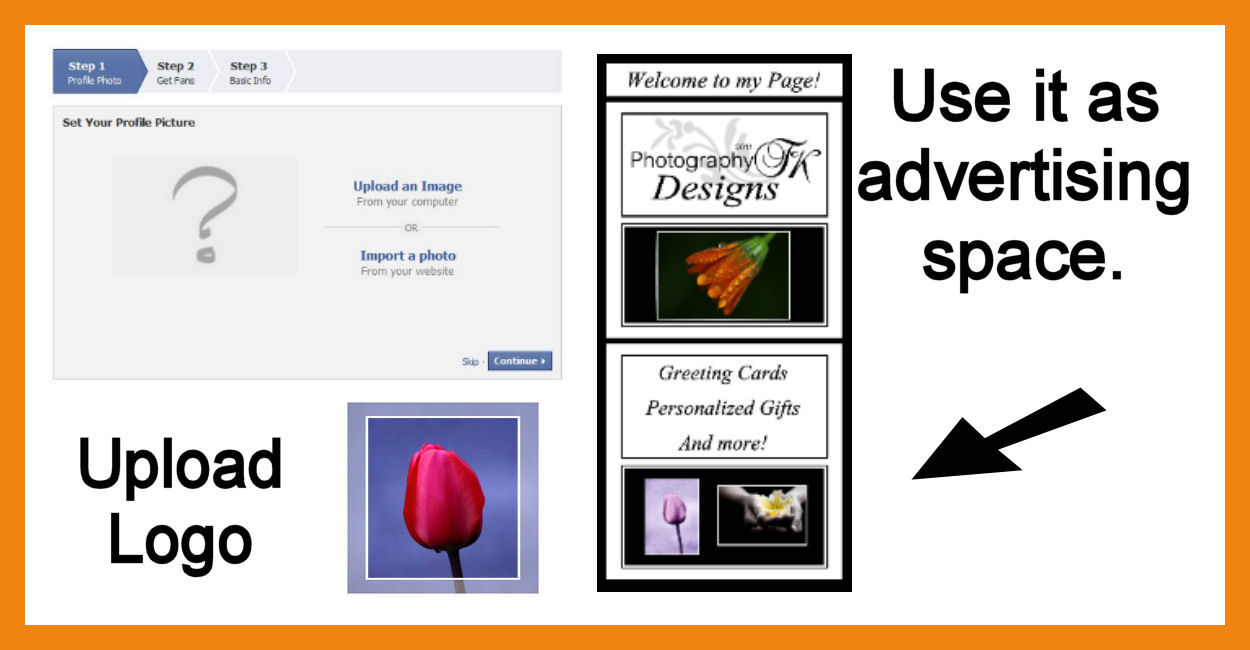
Step 1)

Go to the ‘Create A Page’ on Facebook. How handy is that! The link is right here:

Step 2)

Choose a Category. The Artist, Band, or Public Figure is the easiest one to set up, but take a look at the other options to see what works best for you. Just avoid the ‘Community or Cause’ category. This category does have its place, but this isn’t it. I have mine in the “Local Business or Place/Business Services”. You can edit this once your page is set up.

 
Step 3)

Upload your profile picture. You can go with a simple photo. Or better yet, this is a great spot to advertise yourself and your business. Use a longer image to get the banner look.  (UPDATE: This feature is no longer available. Now FB has Cover Photos. You can have writing on them, but not more that 20% of the area.)


Step 4)

Get fans and fill in your info. You can skip step 2 for now, it won’t hurt anything. If you don’t quite know what to say about yourself in step three, just be brief. You can always go back and change this once your page is set up. 


Step 5)

You’re all set up! First thing to do is become your very own fan. Click the “like” button—or not—It’s up to you. See that wasn’t so hard! 


Now you can click the “Edit Page” button in the upper right hand corner of your page. Before you do anything else, open up the ‘Manage Permissions’ tab to the left of the screen. Find ‘Default Landing Tab’ and choose the page you want new fans to see when they first discover your page. Generally this will be either your wall or your info page. Once you’re comfortable running your page you can set up a Welcome tab for people to land on, but that’s for later.


Take your time to explore all the options and customize your page the way you want it. All that’s left to do is build your fan base. Once you reach 25 fans you can get a personalized user name instead of having all those pesky numbers following your URL.  


You’ll be able to change your URL from this:

 http://www.facebook.com/pages/photographytkdesigns/266013910080267

To this:  http://www.facebook.com/photographytkdesigns  (shameless promotion here! Click on the link and come be my 'fan'!! )

When you get to this point, choose your username carefully. It cannot be changed.

If you found this tutorial helpful and have taken the plunge and set up a business page, feel free to leave a comment on this post with a link to your new page so that others can become your fan.

NOTE: When you become a fan of someone’s page, use both your personal profile and your business page if you have one. ‘Liking’ with your personal profile gives the page owner a new fan (numbers seen on the left of the screen).  And ‘liking’ with your business page is a benefit to both of you because it gives other fans a link back to your page as well. It’s win/win!

Now time to go and delete the new page 
I just set up to create this tutorial! LOL

For helpful tips on harnessing the power of Facebook to promote your business, read my guest blog post from the GCU Community Blog by Corrie Kuipers:  Harnessing the Power of Facebook

Saturday, July 30, 2011

Help! How Do I Make My Image Full Bleed?

"I have an image I really want to use for a card, but the edges are going to get cut off when it's printed. What am I going to do?" Ever have this problem? I know I have. What can you do to extend the edges without losing any of your original design?

The solution lies in a handy little thing called the Clone Brush. Some programs call it the Stamp Tool. Whatever your photo editing program calls it, the concept is basically the same. To get an idea of how it works, there are many tutorials on the Internet. Here's a link to one I found on YouTube by: DigitalVisions.Org.

Practice with this tool to become comfortable using it. Fiddle with the hardness and size of your brush. Increase or decrease the opacity. This will come in handy to keep a seamless image.

"That's great for editing a photo," you say, "but how is that going help me extend the borders of my image?" Let's take a look at an example image we want to extend:


If we just stretch this image, the handle of the teacup and one of the flower petals will get cut off. So let's use our handy new tool: Choose a portion of your image to copy, then paste it on the edge of your canvas.

Take your time. Yes, it's a long process, but the results will be worth it. Decrease the size of your brush when working in tight spaces (i.e.: near the cup handle and the diagonal edge of the book.)


Exhausted yet? Don't stop now! Once you've got all of your edges covered, step back and look at your image to make sure all your lines are straight and flawless.

Now let's take a look at the final result:


Whew! Finally done . . . 
All that hard work--Just to have it lopped off at the printers!!


Sunday, July 24, 2011

Eye Surgery Greeting Cards - Why I Am Creating Them

Imagine sitting in the dim light. Your eyes well with tears as you struggle to thread a needle--something you used to do with ease. The craft that once brought you delight has now become a chore. This is the story my 86-year-old grandmother told me the other evening when I went to her house to help her put her eye drops in. I had never seen eye drops like that before--thick and white like glue. I watched as the liquid spread and clouded her beautiful blue eyes.

Most of us take our sight for granted. Not a day goes by that our eyes don’t get a workout--to work, to play, to capture moments in time to file away as memories. Every day I get my camera out to preserve the beauty I see around me so that I can share it with others.

My grandmother had eyes surgery a while ago. It was supposed to take two weeks to heal, but instead it has been two months of weekly doctor's visits and she is still recovering. Watching her deal with this, among other eye surgeries, is what has inspired me to start creating eye surgery recovery cards. A kind word at the right time may not take the trial away, but it’s comforting to know that someone cares . . .

Saturday, July 16, 2011

Guest Blog by: Rosanne of Red Rose Digital Art

 When I first started creating cards at Greeting Card Universe a few months ago, one of the first Artists I noticed was Rosanne of Red Rose Digital Art. Her lovely signature rose caught my attention immediately and I have been a fan of her work since then. You can just imagine my delight when she accepted my invitation to do a guest post on my blog. 

Thank You, Rosanne!
The floor is all yours:

It’s a great image but is it a great greeting card?

First of all, a big thank you to Tracie Kaska of Photography TK Designs for the opportunity to contribute to her blog today. Tracie is a fine photographer and I am really enjoying the results of her 365-day photography challenge!

So, on with today’s post.

One of the most satisfying things you can do with an image is to share it with others. Sure, you can post it on the internet for others to see, but one of the best ways you can share an image is as a greeting card. I do this all the time. I make custom greeting cards from my photographic images for friends and family but, like Tracie, I also design greeting cards as a freelance artist with Greeting Card Universe.
You’d think that it would be easy to make a good photographic greeting card but it’s not just about dropping a random pretty image on to a sheet of paper and printing it out. There are a few things to think about and a few technical details to work out and then you’ll be ready to rumble.

1. Who am I designing this greeting card for?

Is it for your grandmother? Is it for your nephew? Is it for a complete stranger to purchase and then send to a close friend? These are things that need to be thought about. After all, your grandmother might be partial to flowers, your nephew may love sports and the complete stranger may well love animals! When I set out to design a greeting card, I always think about the occasion and person the card will be for and then review my image portfolio carefully prior to making my final selection.


2. What size is a greeting card?

The easy answer to this is 5 inches by 7 inches (portrait) or 7 inches by 5 inches (landscape) at a 300 pixel per inch when folded in half. This is one of the most popular sizes for greeting cards. There are other sizes available but these are the precise dimensions of greeting cards at Greeting Card Universe and we use a template of 2100 pixels by 1500 pixels in order to get it right every time. Create one of these in your favourite image editing program and use it every time you create a greeting card.

3. Is my chosen image “greeting card” ready?

When I started with digital photography, my camera produced “massive” four megapixel images. These are small by today’s standards but a four megapixel image prints exceptionally well on a US Letter or A4 page. This is more than twice the size that you need to make an excellent greeting card. Fast forward eight years and my camera produces almost 18 megapixel images – even more to deal with! So one of the first things you will face is “Do I reduce the size of my image?” or “Do I make a creative crop of my image and use just a section of it?”

Today’s example: A creative crop.

In this example, I’m really talking about a crop! When I was in New Zealand a few years ago, I saw something quite surreal – 32 different mailboxes all in a row on the edge of a small housing estate. I leaped out of my car and snapped off six images to capture them all so I could use them as the foundation for a panorama – the only way to do justice to them all. I’ll talk more about shooting for panoramas in another post soon.


“Thirty Two Mailboxes” – © Red Rose Digital Art - Rosanne E. Casu.

As fun as this image is, it just does not translate in its entirety to a greeting card. However, a small portion of it certainly did:

Open your 2100 pixel by 1500 pixel template as well as your starting image in your image editing program. I use Adobe Photoshop CS5 but this should work with Photoshop Elements and Paint Shop Pro as well. Bring your source image to the front and then choose Layer > Duplicate Layer …. Duplicate your image and choose your template document as the destination.


As you can see, the image is much too big but that can easily be fixed by resizing the image while constraining the dimensions until its length is identical to the length of the template.


Then reposition the image until you are pleased with the composition and choose Image > Trim … to trim away the parts of the image that you no longer require.


 Now it’s a cute picture but it’s still not quite ready to be a greeting card image yet.

When I looked at this image, I immediately thought of posting letters, saying hello and new neighbours. At that point, I thought that this image would be very appropriate for a “Welcome to the neighbourhood” greeting card which is precisely what I did with it. A cute “handwriting” font did the trick and I was done.


As you can see, a lovely image can be made into a great greeting card, but sometimes it just needs a little extra thought! Why not try and make a greeting card with the next image you really love?

If you enjoyed this post and the images presented here, please check out Rosanne’s main web site at http://www.redrosedigitalart.com/, her on-line photo gallery directly at http://redrosedigitalart.artistwebsites.com/ or her greeting cards at http://www.greetingcarduniverse.com/RedRoseDigitalArt. You can also find her on Facebook at http://www.facebook.com/RedRoseDigitalArt. Come and say “Hi”!

Wednesday, July 13, 2011

New Card Category at Greeting Card Universe

Yesterday a request was made by customers who had just lost their grandfather.They wanted a card to say they missed their grandmother and were on their way to see her. They are hoping it arrives before they do to cheer her up because of the long drive they have to take to get there.

I was happy to be able to contribute two cards to this new category. I have been searching for the right theme for my Stop Sign photos I took earlier this year.


These are some of the other cards added to this new category that I thought fit the occasion well. One because this family has a long drive ahead of them, two because they just look like they would appeal to a grandmother, and the last because it seemed appropriate for a sad, yet joyous reuniting.